Linux Architecture
The architecture of the Linux operating system works in four layers:
- Hardware
- kernel
- shell
- System Utility
Hardware Layer:
The Hardware Layer consists of all physical devices attached to the system. Example: Motherboard, RAM, CPU, Hard disk drive, etc.
Kernel:
The kernel is one of the core sections of the operating system. It is responsible for each of the major actions of the Linux operating system. This operating system contains distinct types of modules and cooperates with underlying hardware directly. The kernel gives each process its own virtual resources and prevents or mitigates conflicts between different processes.
Shell:
The Shell is the interface between the kernel and the user. It takes commands through the user and runs the functions of the kernel. The shell is available in different types of operating systems. These shells are of two different types: graphical shells and command-line shells.
The graphical line shells provide the graphical user interface, while the command line shells provide the command line interface. Both shells perform the same operations, but the graphical user interface shell is slower than the command line.
System Utility:
These are the utility programs that run on Shell. This can be any application like your web browser, media player, text editor, etc.
File System Hierarchy Standard:
File System hierarchy standard describes directory structure and its content in UNIX and UNIX like operating systems. It explains where files and directories should be located and what they should contain.
In UNIX or UNIX-like operating system, everything is considered as a file.
Only Linux distributions follow the FHS and that too partially. Because each distribution has its own policy, you notice many differences in the directory structure of various distributions.
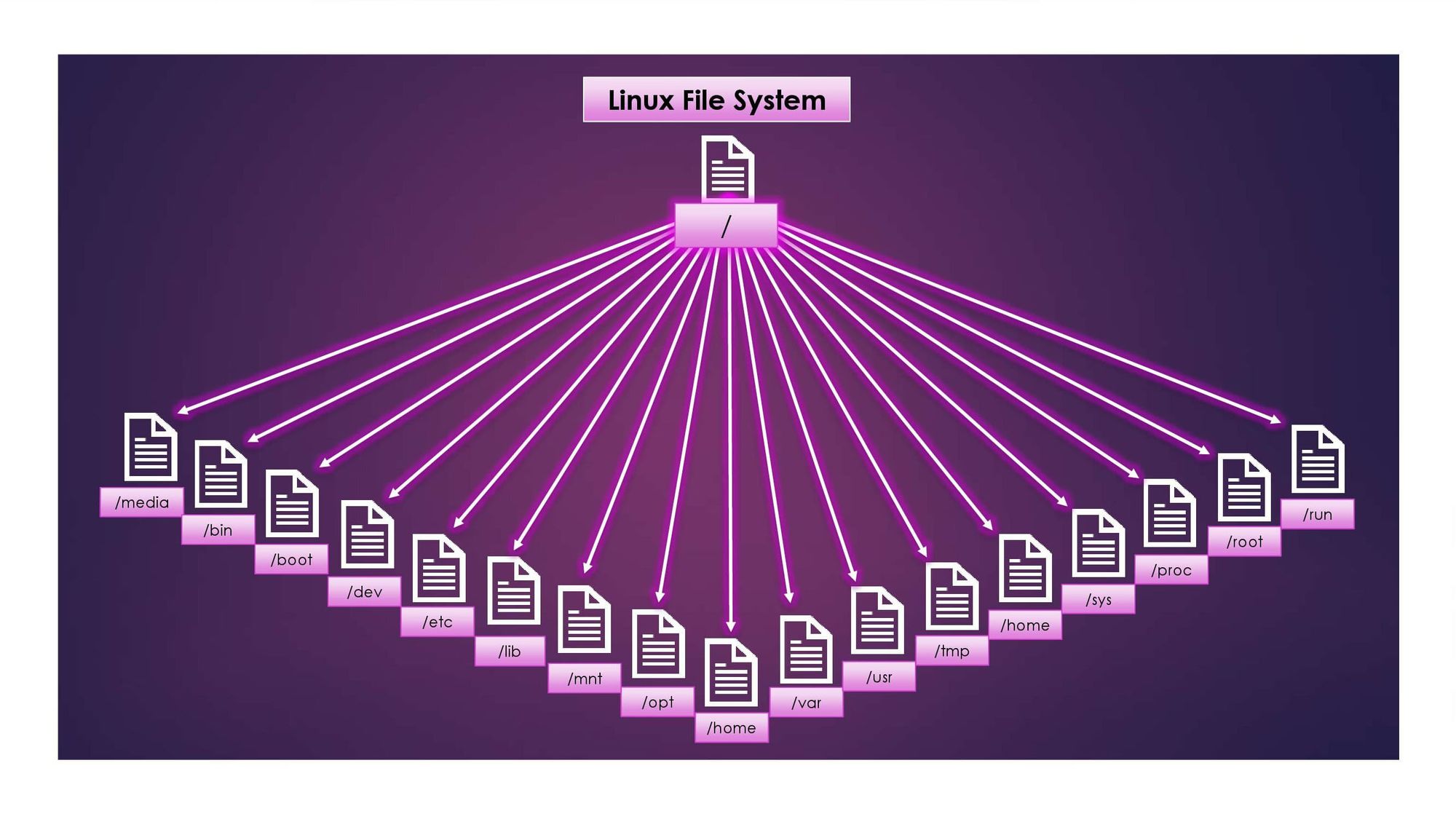
/ The top-level directory is the root filesystem and contains all of the files required to boot the operating system before other filesystems are mounted and the files required to boot the other filesystems. After boot, all other filesystems are mounted at standard mount points as subdirectories of the root.
/bin Contains the essential binaries.
/boot Contains the static files of the boot loader.
/dev Contains the device files.
/etc Contains host-specific system configuration.
/lib Contains shared libraries and kernel modules.
/media It is the mount point for removable media.
/mnt it is the mount point for mounting a filesystem temporarily.
/opt Optional files such as third-party tools can be saved here.
/run contains data relevant to running processes.
/sbin Contains essential system binaries.
/tmp Contains temporary files.
/usr Contains executables, libraries, man files, etc.
/var Contains variable data files such as log files, email inboxes, web application-related files, corn files, and more.
/home Each user on this system has a subdirectory here for storage.
/root This is the home directory for the root user.
This is for now :) Thanks for reading! Make sure you subscribe to the blog for more upcoming Linux Articles!