“Unlocking the Secrets of Steganography: A Comprehensive Guide to OpenStego.”

OpenStego is an open-source steganography software that allows users to hide information within various files, including images, audio, and video files. It is a popular tool among steganography enthusiasts because of its user-friendly interface and support for solid encryption algorithms.
In this blog, we will look closer at OpenStego, its features, and how to use it to hide information within files.
Features of OpenStego:
- Supports various file formats: OpenStego supports multiple formats for embedding and extracting hidden data. These formats include images, audio files, and video files.
- Advanced encryption: OpenStego provides advanced encryption techniques to protect confidential data and supports AES and Blowfish encryption algorithms, widely used in the industry for securing data.
- User-friendly interface: OpenStego provides a user-friendly interface that makes it easy for users to hide and extract data within files. The interface is designed so that users quickly and easily navigate the software.
- Command-line interface: Besides the graphical user interface, OpenStego provides an aand-line interface for advanced users who prefer using command-line tools.
- Open-source: OpenStego is open-source software that is freely available to the public. This allows users to modify and customize the software according to their needs.
How to use OpenStego:
To use OpenStego, follow these steps:
- Download and install OpenStego: OpenStego is available for multiple operating systems, including Windows, Linux, and macOS. Download the compatible version with your operating system and install it on your computer.
- Launch OpenStego: Once OpenStego is installed, launch the software.
- Select the file to embed data: To embed data within a file, click on the "Embed" the “Embed” button and select the file ed data within.
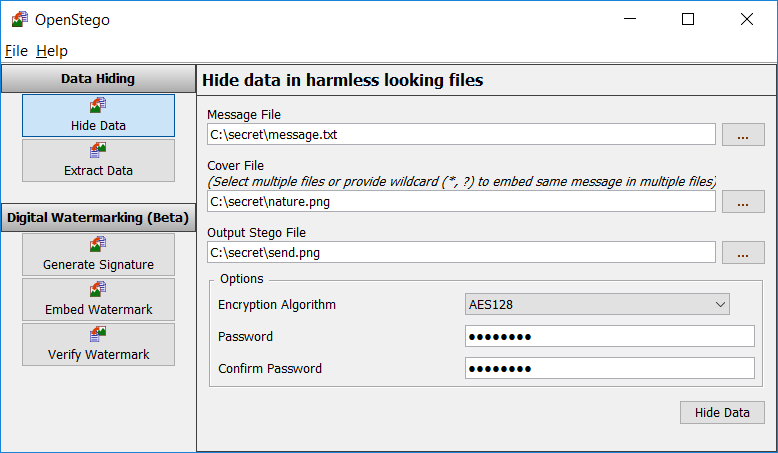
- Select the data to embed: Select the data you want in the file. OpenStego supports various data types, data types, images, and files.
- Configure the encryption settings: OpenStego provides various encryption settings that can be customized according to your needs. Configure the settings according to your preferences.
- Embed the data: Once you have configured the encryption settings, click on the "Embed" bun to embed the data within the file.
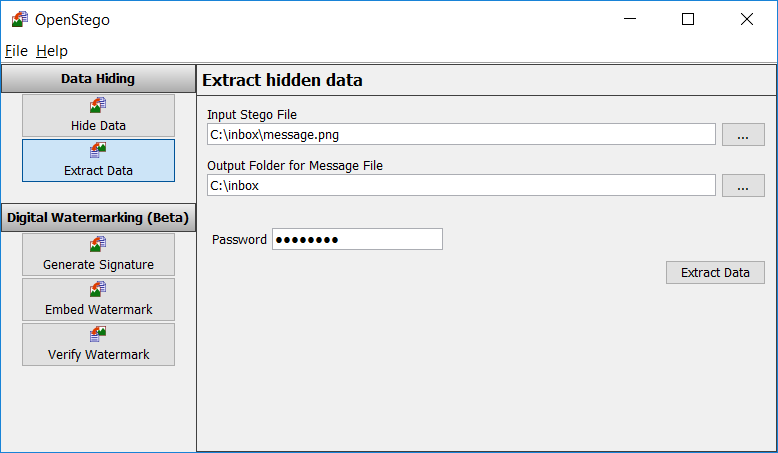
- Extract the data: To extract the hidden data from the file, click the "Extract" but he“Extract” button and select the file data. Remove will extract the hidden removed and display it on the screen.
Conclusion:
OpenStego is a powerful steganography tool with advanced encryption techniques and a user-friendly interface. It is an excellent tool for beginner and advanced users who want to hide information within files. However, using these tools responsibly and within legal boundaries is essential. Ensure you have the necessary permissions and legal authority before using steganography tools.